Last Updated: October 16, 2019
This document outlines the set-up for integrating the InfiPlex Inventory & Order Management System (OMS) with your Maisonette.com Seller's Account.
InfiPlex Maisonette.com Integration Set-up
 To connect, you must have an active Maisonette seller account. If you do not already have a Maisonette seller account you can apply for a Maisonette seller account here.
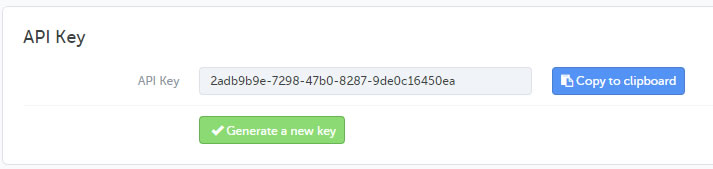
From your Maisonette seller account, follow these steps to get your API connection key.
- In the Back Office, click on your user name in the top right
- Click the API Key tab
- Click Generate a new key
- Click Validate
- Copy the API Key
Adding your Key to InfiPlex OMS
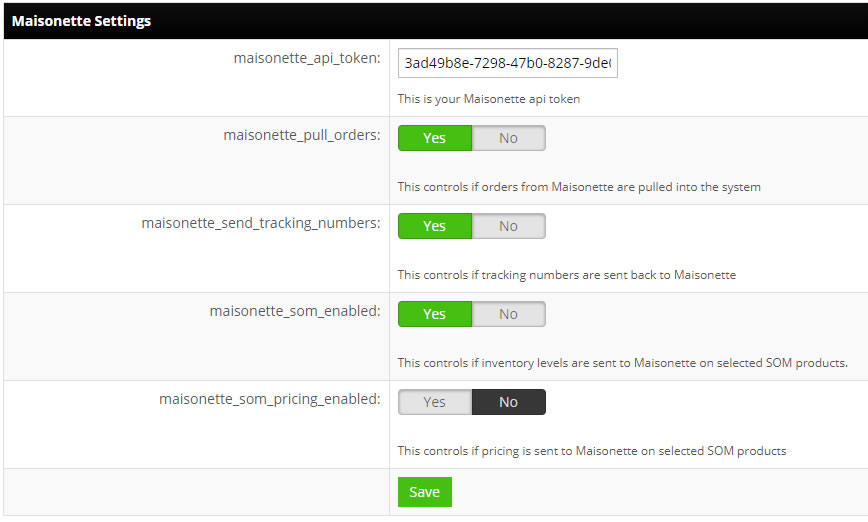
- Go to the Settings > Integrations area of your InfiPlex site
- Click on the Maisonette logo
- Update the maisonette_api_token setting with your Maisonette key
- maisonette_pull_orders: set this setting to YES
- maisonette_send_tracking_numbers: set this setting to YES
- maisonette_som_enabled: this setting controls if inventory levels are sent back to Maisonette, should be set to YES
- maisonette_som_pricing_enabled: default for this NO. Only turn this on if you are wanting to use the Price area to update pricing on your Maisonette SKUs