
Last Updated: Aug 28, 2019
The Unknown SKU Settings allow you to have the OMS automatically add newly found SKUs as they come through on orders.
InfiPlex Auto-Add Unknown SKUs
You can configure InfiPlex to automatically add new SKUs that come through on orders. Simply update the Unknown SKU Settings to have InfiPlex automatically add new SKUs to your OMS. You will get emailed when this happens and you can then go back into the OMS to update the SKU with the proper inventory level. Newly added SKUs also get associated to all of your marketplaces, so you will also need to update the SKUs marketplace associations if it is not being sold on all connected marketplaces.
- You will find the settings on the Settings > Base Settings > Miscellaneous tab.
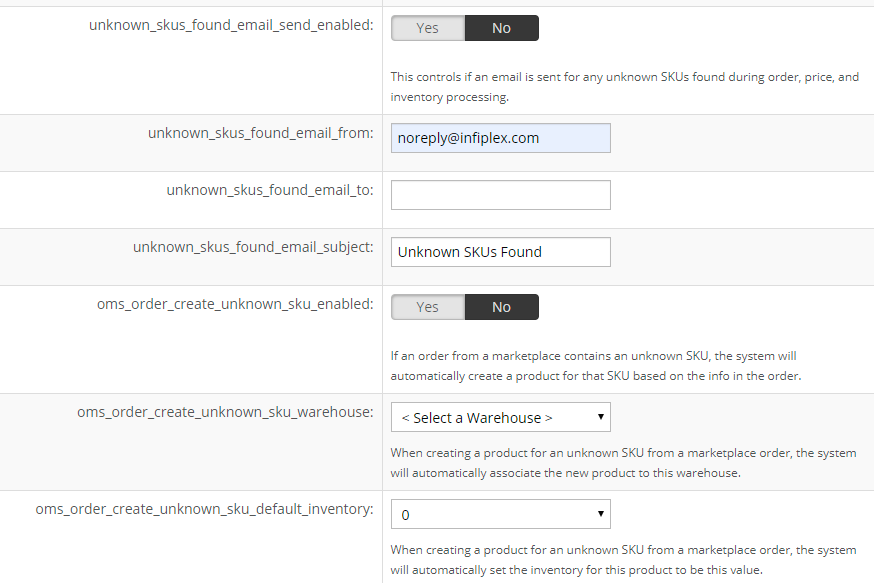
- unknown_skus_found_email_send_enabled:
- This controls if an email is sent for any unknown SKUs found during order, price, and inventory processing. - unknown_skus_found_email_from:
- Set this to use noreply@infiplex.com - unknown_skus_found_email_to:
- Enter the email address you want to send the email to
- separate multiple emails with a semi-colon ; - unknown_skus_found_email_subject:
- Set the subject line for the email that gets sent - oms_order_create_unknown_sku_enabled:
- Set this to YES
- If an order from a marketplace contains an unknown SKU, the system will automatically create a product for that SKU based on the info in the order - oms_order_create_unknown_sku_warehouse:
- When creating a product for an unknown SKU from a marketplace order, the system will automatically associate the new product to this warehouse - oms_order_create_unknown_sku_default_inventory:
- When creating a product for an unknown SKU from a marketplace order, the system will automatically set the inventory for this product to be this value
Managing Connected Marketplaces for Inventory Updates
A SKU that gets added to the OMS using the Unkown SKU settings will get associated to all of your connected marketplaces. This will have the OMS send inventory updates to all marketplaces. You should update the OMS to only associate the SKU to the marketplaces it is actually listed on. To enable products for specific marketplaces, please see the SKU Utilities tool, which allows you to quickly associate a list of SKU numbers to specific marketplaces. The SKUs need to be associated to the correct marketplaces so the system knows which marketplaces need inventory updates when a SKU is ordered or you add additional inventory via the Inventory page. Reference the For Selected Sell On row to learn how to make the SKU / Marketplace associations.